Have you ever looked at a power switch and wondered if the letter I or the letter O means the device is on? You are not alone. Many people see these symbols on computers, chargers, televisions, power supplies, and other electrical devices but are unsure which one to press.
The symbols can look confusing because they are not always written as ordinary words. Instead, manufacturers use simple marks to show whether a device is running or turned off. Once you understand these symbols, using electronic devices becomes much easier.
The question “is I or O on” is common among people who use computers, gaming systems, kitchen appliances, and other electrical equipment. You may also see these symbols in product manuals, online searches, school lessons, or workplace instructions.
The good news is that there is a simple rule to remember. The letter-like symbol I usually means ON, while O means OFF on a standard power switch. However, combined symbols and special controls can have different meanings depending on the device.
Understanding these symbols can help you operate your devices correctly and avoid confusion. In this guide, you’ll learn the meaning, examples, usage, differences, common mistakes, and simple explanations in easy English.
Is I or O On? – Quick Answer
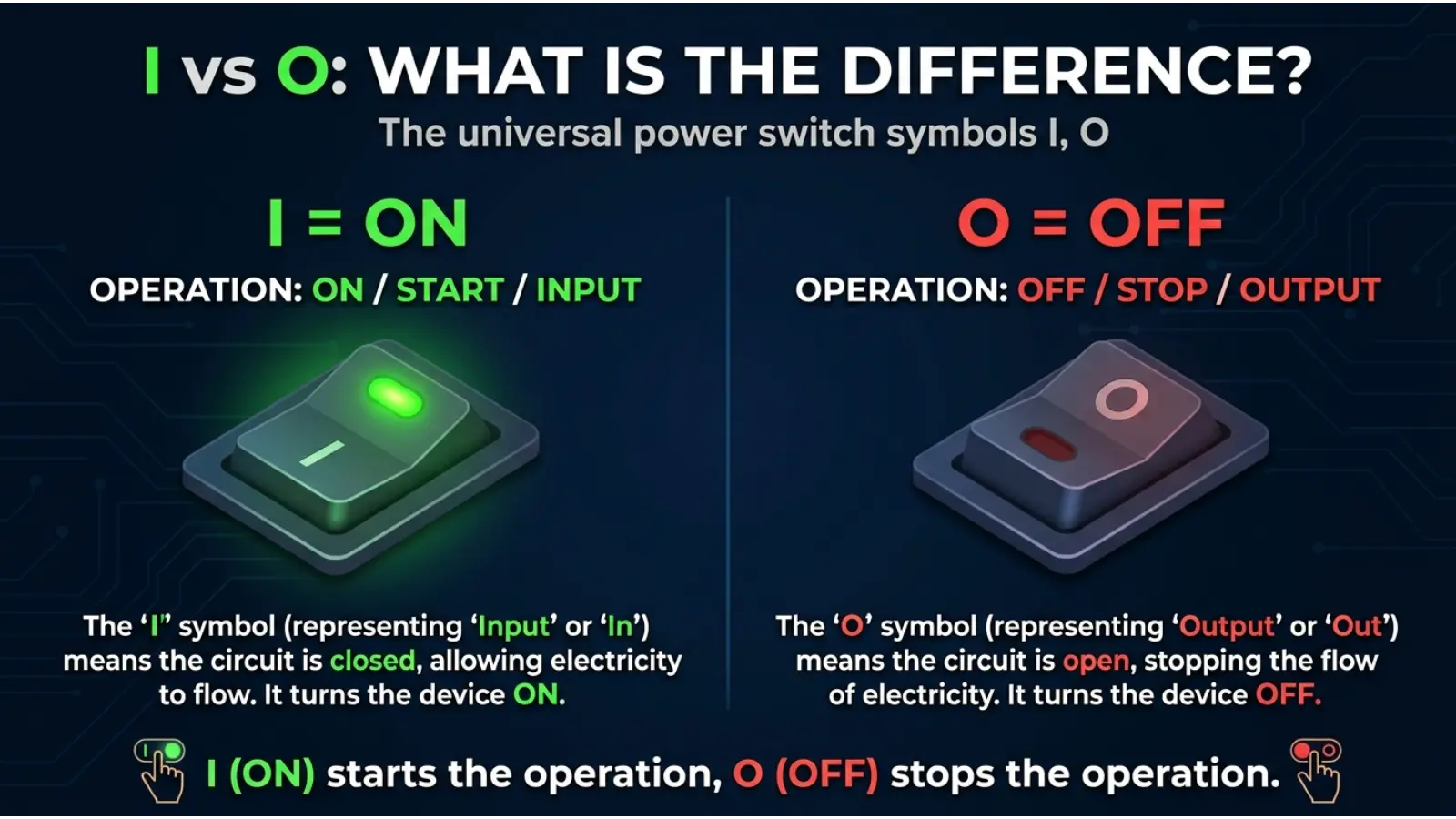
I means ON, and O means OFF on a standard power switch.
- I = ON: The electrical circuit is switched on.
- O = OFF: The electrical circuit is switched off.
These symbols are based on the ideas of a binary system, where 1 represents ON and 0 represents OFF.
Simple examples
- A computer power switch marked I/O is set to ON when the I side is pressed.
- A power supply marked I and O uses I for ON and O for OFF.
- A device with a simple I/O rocker switch is usually ON when the I side is pressed down.
Easy memory rule: I = 1 = ON, while O = 0 = OFF.
The Origin of I and O Power Symbols
The I and O symbols come from the binary system used in electronics and computing. In this system, 1 and 0 represent two basic states.
- 1: A signal or state is active.
- 0: A signal or state is inactive.
Over time, these numbers became common ways to show the ON and OFF states of electrical equipment. The number 1 is represented by a straight vertical line, which looks like I. The number 0 is represented by a circle, which looks like O.
These symbols became widely recognized on computers, electrical appliances, and power switches. They are useful because people can understand them even when they speak different languages.
Today, you can find them on many types of electronic equipment, including desktop computers, monitors, power supplies, and household appliances.
British English vs American English Usage
The meaning of I and O on power switches is the same in British and American English. There is no difference in their basic meaning because these are standard technical symbols rather than ordinary English words.
| Feature | British English | American English | Notes |
|---|---|---|---|
| I symbol | ON | ON | Indicates the on state |
| O symbol | OFF | OFF | Indicates the off state |
| I/O switch | Power control | Power control | Used on electronic devices |
| Power button | Common | Common | May use symbols or words |
In both countries, manufacturers use these symbols on many electronic products. The exact switch design may vary, but the basic meanings remain the same.
Which One Should You Use?
If you want to turn on a device, look for the I symbol. If you want to turn it off, look for O.
Here is how to use the symbols in everyday situations:
- Turning on a computer: Set its rear power switch to I if it has one.
- Turning off a power supply: Move the switch to O.
- Using a monitor: Check whether its power control uses I/O symbols.
- Operating a household appliance: Follow the labels on the appliance.
- Using a device with a combined symbol: Check the manual to understand whether it is a power button or a standby control.
What if the switch has both I and O?
Many rocker switches have I on one side and O on the other. Pressing the I side usually turns the device on, while pressing the O side turns it off.
However, some devices have separate controls for power and standby. Always check the device’s instructions if the switch behavior is unclear.

Common Mistakes With I and O
People sometimes mix up these symbols because they look similar to letters.
Mistake 1: Thinking O means ON
❌ Incorrect: O means the device is on.
✔ Correct: O generally means OFF on a standard power switch.
Mistake 2: Thinking I means OFF
❌ Incorrect: Pressing I turns the device off.
✔ Correct: I generally represents ON.
Mistake 3: Confusing the symbols with letters
❌ Incorrect: I and O are just random letters printed on the switch.
✔ Correct: They represent the binary states 1 and 0.
Mistake 4: Assuming every button works the same way
❌ Incorrect: Every button marked with a circle must completely disconnect power.
✔ Correct: A circle with a vertical line, or a similar combined symbol, may represent a power or standby control. Check the device instructions.
Mistake 5: Ignoring the device’s instructions
❌ Incorrect: Every switch must be operated in the same way.
✔ Correct: Most standard I/O switches follow the same rule, but specialized controls can behave differently.

Is I or O On? Everyday Examples
Let’s look at some common situations where these symbols appear.
1. At work
A desktop computer may have a power supply switch at the back. If the switch is set to I, the power supply is enabled. If it is set to O, the supply is switched off.
2. At school
Students may see I and O symbols on laboratory equipment, computer systems, and classroom electronics. Learning these symbols helps them understand basic electrical controls.
3. On social media
People often ask questions such as “Is I or O on?” in online forums when setting up a new computer or troubleshooting a device.
4. In daily life
You may find I/O switches on speakers, extension equipment, monitors, and some kitchen appliances. The same basic rule usually applies.
5. While gaming
Gaming computers and some gaming accessories have power controls with I/O markings. If the main power supply is set to O, the computer may not start until the switch is moved to I.
Remember that the main power supply switch and the computer’s front power button may serve different purposes.
Is I or O On? – Google Trends and Usage Data
People search for “is I or O on” because they want a quick answer about power switches. The wording is simple, but the symbols can be confusing if someone has never learned their meaning.
Common reasons for searching include:
- Setting up a new computer.
- Checking a power supply switch.
- Using an unfamiliar electronic device.
- Troubleshooting equipment that will not turn on.
- Understanding symbols in a product manual.
People in the United States, United Kingdom, India, Pakistan, Canada, and Australia may all encounter these symbols because electronic equipment is used worldwide.
However, without verified Google Trends data, it would be inaccurate to claim that one country searches for this exact phrase more than another or that its popularity is increasing.
The topic is useful for beginners because it answers a practical question in just a few words. It is also easy to remember once you connect I with 1 and O with 0.
Comparison Table: I vs O on a Power Switch
| Feature | I | O |
|---|---|---|
| Meaning | ON | OFF |
| Binary value | 1 | 0 |
| Power state | Enabled | Disabled |
| Typical switch position | I side pressed | O side pressed |
| Common use | Starting or enabling equipment | Stopping or disabling equipment |
| Memory trick | I looks like 1 | O looks like 0 |
This table applies to standard switches marked with I and O. Other symbols, such as a circle with a vertical line, can have a different or more specific function.

I and O in Professional Life
These symbols are important in workplaces where people use electrical equipment every day.
For example, office workers may need to turn on monitors, computer power supplies, printers, or other devices. Technicians may also use I/O markings when checking equipment.
Knowing the symbols helps people:
- Operate equipment correctly.
- Follow basic instructions.
- Avoid confusion when setting up devices.
- Understand common labels on electronic products.
In professional settings, it is still important to follow workplace safety rules. Never open electrical equipment or handle exposed wires just to check whether a switch is on or off.
I and O for Students or Beginners
Beginners may find these symbols confusing because I and O look like letters instead of numbers. The easiest way to learn them is to connect them to the binary values used in electronics.
Try these simple learning tips:
- Remember that I resembles the number 1.
- Remember that O resembles the number 0.
- Connect 1 with ON and 0 with OFF.
- Look for these symbols on familiar devices.
- Read the device manual when a control is unclear.
Students learning about computers and electronics may come across binary numbers, logic circuits, and power controls. Understanding I and O provides a simple starting point.
Signs or Characteristics Related to I and O
Here are the main features that help you recognize these symbols:
- I symbol: Usually represents the ON state.
- O symbol: Usually represents the OFF state.
- I/O marking: Often appears on a rocker switch with two positions.
- Combined power symbol: A circle with a vertical line often represents a power button or power control.
- Standby symbol: A related symbol may indicate standby rather than a complete power disconnection.
- Device labels: Words such as ON and OFF may appear alongside the symbols on some equipment.
The shape and location of a symbol can help you understand its purpose. When in doubt, check the manufacturer’s instructions.
Simple Trick to Remember I or O On
The easiest trick is to connect the symbols to the numbers 1 and 0.
- I = 1 = ON
- O = 0 = OFF
Think of it this way: the vertical line looks like the number 1, while the circle looks like the number 0.
For example, if you want to turn on a computer power supply with a standard I/O switch, move the switch to I. If you want to switch it off, move it to O.
Once you learn this simple rule, you will recognize the symbols on many electronic devices.
FAQs
1. Is I or O on?
I means ON, while O means OFF on a standard power switch.
2. Does I mean on or off?
I usually means ON. It represents the number 1 in the binary system.
3. Does O mean on or off?
O usually means OFF. It represents the number 0.
4. Which side of an I/O switch should I press to turn on a device?
Press the I side on a standard rocker switch to turn the device on.
5. Why do power switches use I and O instead of words?
These symbols are simple, compact, and widely understood across different languages.
6. Is the I/O switch meaning the same worldwide?
Yes. The basic meanings are the same in British English, American English, and many other countries.
7. Does O always mean the device has no electrical power?
Not necessarily. O generally means the switch is off, but some devices may still have power in other parts of their circuits. Follow the manufacturer’s safety instructions.
Conclusion
The answer to “is I or O on” is simple: I means ON, and O means OFF on a standard power switch. These symbols come from the binary system, where 1 represents ON and 0 represents OFF.
You can find them on computers, monitors, power supplies, and many other electronic devices. Although the symbols have standard meanings, some power and standby controls work differently.
The easiest memory rule is I = 1 = ON; O = 0 = OFF. Remember this rule, and you will have a much easier time understanding power switches.

Sara Taylor is a passionate English content writer who specializes in word meanings, spelling comparisons, and modern slang explanations. She creates easy-to-understand articles that help readers avoid common English mistakes and improve their writing skills. Her content focuses on simple learning, real-life examples, and clear explanations for everyday readers.